.webp)
Smart Bidding Exploration: The Guide to Scaling Google Ads Conversions
What is Smart Bidding Exploration?
First introduced at GML in May 2025, Google’s "Smart Bidding Exploration" has been described as the most significant update to bidding in over a decade. Originally launched exclusively for search campaigns, this feature has since expanded to include Performance Max campaigns without product feeds, along with beta support for Shopping and other Pmax formats.
How Smart Bidding Exploration Improves Target ROAS
Smart Bidding Exploration is designed to make target ROAS (Return on Ad Spend) strategies more flexible, allowing advertisers to capture traffic from more diverse sources and scale conversion volume using their existing targeting. To utilize this feature, campaigns must use target ROAS bidding and maintain sufficient budget headroom to avoid being budget-limited. By intelligently opening up the bidding process to a wider range of user queries, it helps campaigns achieve greater performance and reach.
How to Activate Smart Bidding Exploration
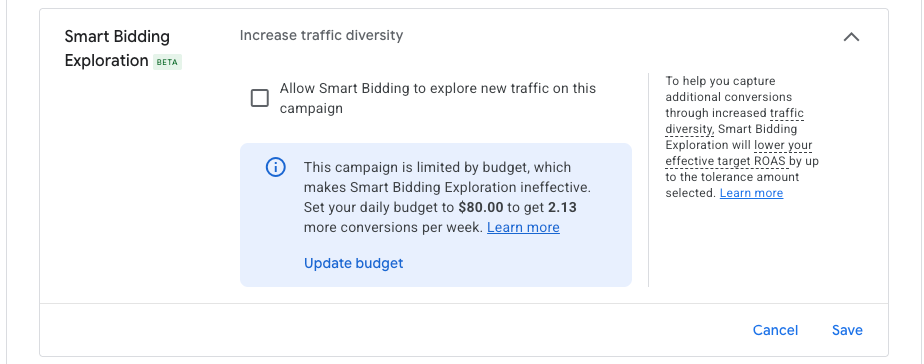
In order to activate Smart Bidding Exploration in your account, go to campaign settings. You will find the option within the Budget & Bidding Optimization section.

Expand the section marked “Smart Bidding Exploration.”
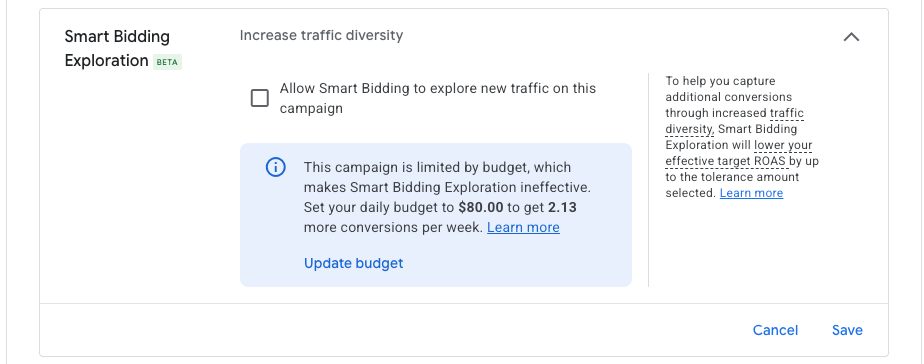
Select the checkmark box for “allow Smart Bidding to explore new traffic on this campaign.”
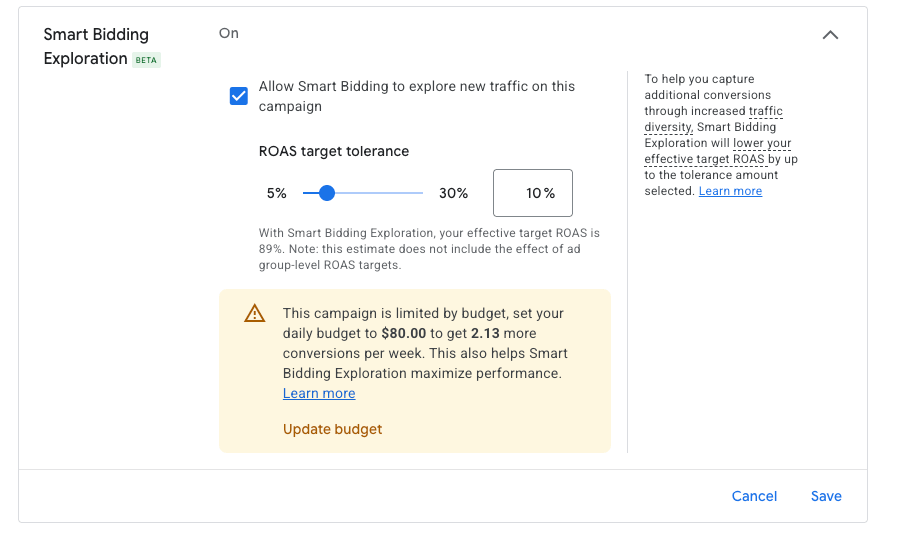
Setting Your ROAS Tolerance Targets
From here, you can set your ROAS target tolerance. This essentially shows how far away from your ROAS target you are willing to go in order to expand searches. Google gives you a sliding indicator from 5-30%. For example, if your ROAS target was set at 100%, the tolerance would lower it anywhere from 95%-70%, depending on the amount you select. Note that Smart Bidding Exploration will only lower your ROAS target. Once you’ve selected your tolerance target, click save and your campaign will function with the Smart Bidding Exploration function enabled.
Essentially, this would seem to be the same as lowering your ROAS target, however, Google indicates that the difference between lowering your ROAS target and using Smart Bidding Exploration is that Google does not uniformly lower your targets but rather informs the algorithms to bid higher on specific traffic segments in order to capture additional performance out of the campaign. You can read more about this here.
How to Measure Effectiveness
You can check how Smart Bidding Exploration performed by viewing your bid strategy report. The easiest way to get to this report is to click on your bid strategy name in the campaigns view.
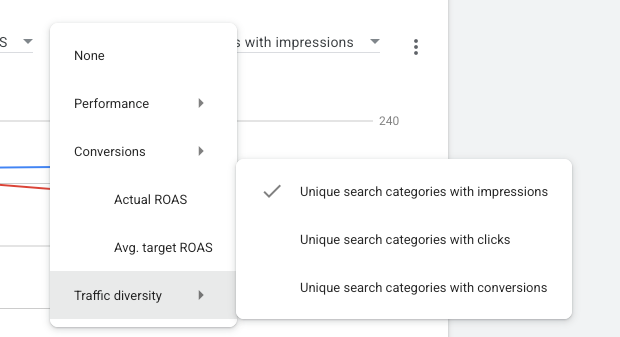
The green bar represents when Smart Bidding Exploration was used. You will want to pay attention to the categories represented under the “traffic diversity” section of your report.
Best Practices for Testing and Results
Google recommends you test Smart Bidding Exploration for 6-8 weeks and compare conversion volume and traffic diversity metrics pre and post enabling the feature to determine its effectiveness.
By taking the time to test Smart Bidding Exploration for the recommended 6-8 week period and carefully analyzing your bid strategy reports, you can gain valuable insights into how this feature impacts your campaign's conversion volume and traffic diversity. As with any significant change to your bidding strategy, success lies in closely monitoring the results against your baseline metrics. By utilizing data-driven adjustments rather than guessing, you can determine if this tool is the right lever to help your campaigns reach their full potential and unlock new opportunities for growth.