.webp)
If you’ve already adopted AI Max as part of your non-brand search strategy, then you may have experimented with the Text Guidelines feature. Google recently added this feature to AI Max so users could input messaging restrictions regarding Google’s AI-enabled text customization. Text guidelines are set at the campaign level in both Search and Performance Max and are designed to help you meet brand requirements as well as offer guidance for Google AI-created assets.
How to Implement Text Guidelines
If you haven’t used this feature yet in a search campaign, you will find it within campaign settings, under AI Max, after selecting the dropdown for asset optimization, under “text customization.” It will only populate once text customization is turned on. Once that is enabled, you will see the option to click “add text guidelines.”
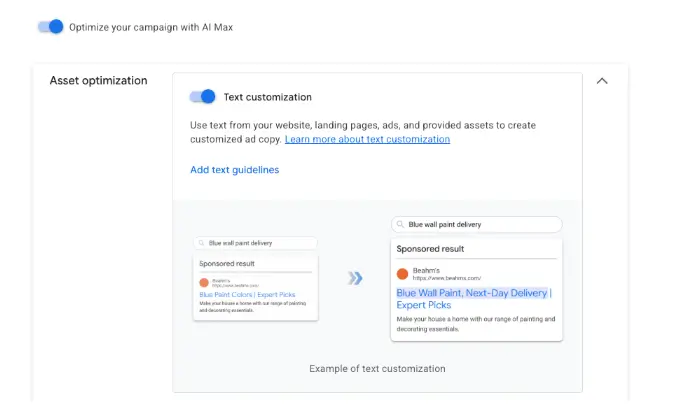
If you are in Performance Max, then you will see this option within the “other settings” in the campaign settings section, under “asset optimization,” within the text section once that section is expanded.
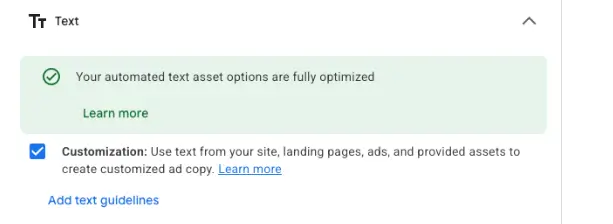
Both of these options will populate another box that will allow you to input your text guidelines.
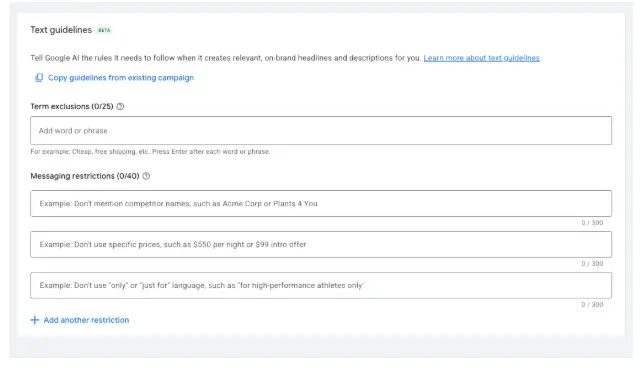
Types of Text Guidelines in Google Ads
If you’ve never used text guidelines before, here are some things to keep in mind.
There are 2 different options Google gives us here, both term exclusions and messaging restrictions.
Term Exclusions
Term exclusions are exact words or phrases that you want excluded from all generated text assets. You can add up to 25 term exclusions per campaign. Google gives the examples of “cheap, unlimited, low cost, etc.” A couple of things to note about term exclusions is that they are language specific and they cannot prevent assets with prices from being generated. To do this, it is recommended you utilize messaging restrictions.
Messaging Restrictions
Messaging restrictions allow you to define the tone of voice, callouts and restrictions for your brand. You can add up to 40 of these per campaign. Google also recommends you add an example after your messaging restriction of what you are asking to be restricted - to provide additional clarity. Unlike term exclusions, messaging restrictions are not language specific and will be respected across all languages. Google also gives some good examples of effective messaging restrictions in their support article:
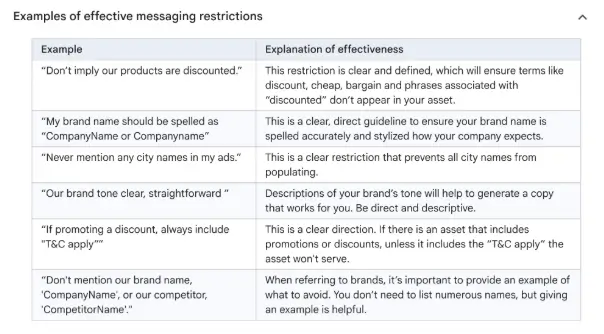
How Text Customization Works
Once these rules are in place, Google will also respect them for your existing Google-optimized text assets. The existing assets that do not meet your guidelines and restrictions will stop serving and be marked as removed. All new assets created by Google will respect these new rules.
Implementing these text guidelines is a vital step in maintaining brand consistency while fully leveraging the power of Google's AI-optimized campaigns. We encourage you to audit your existing assets today to ensure they align with your brand guidelines. If they do not and you do not currently have this in place, text guidelines are a great way to ensure your messaging remains both impactful and on-brand.