.webp)
What are Google Ads Solutions?
Hidden in the Tools section of Google Ads, under Bulk Actions, you will find the option to add “Solutions” to your Google Ads account. For those of you who do not already work with a third party API optimization tool, Solutions offers pre-programmed scripts you can add to your account to accomplish certain, specific tasks. In the past, users would have to write or paste Javascript snippets into Google Ads to automate workflows, but solutions offer these options to you pre-built - no code needed.
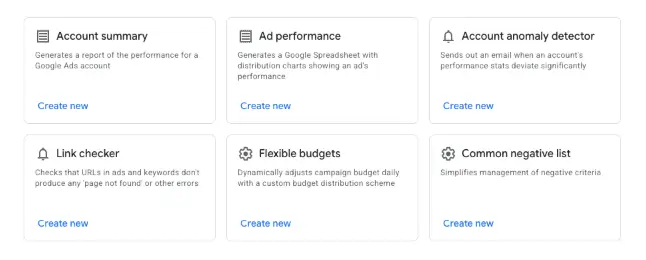
Adding a new solution to your account is easy. Simply hit the blue plus button. After that, you will see the below options.
The Key Benefits of Using Solutions
The solutions themselves are fairly self explanatory and can save you some valuable time as an account manager. There are a few key benefits in particular.
No Coding Required
The first being that absolutely no coding is required. Google takes the guesswork out of script building through providing these pre-packaged options. It also provides a user-friendly UI to implement these workflows.
Identifying and Preventing Wasted Ad Spend
Secondly, the solutions options are designed to inform you if ad spend is being wasted. In my opinion, the Link Checker should be a part of every account you manage. How many times have you had a website go down and not realized it until days later when your ads got disapproved? Link Checker regularly crawls landing pages linked to your ads and keywords and sends you an alert via email if it detects broken urls or other landing page errors.
Automated Reporting for Better Efficiency
Lastly, Google has automated regular alerts and reports through both the account summary and the account anomaly detector. Running these regularly can help you keep tabs on the most important metrics in your account.
Best Practices for Managing your Automated Solutions
There are some things to keep in mind when you opt into running these solutions.
- Authorization is Required.
- Like all scripts, Solutions requires user authorization in order to run.
- Always Run a Preview First.
- To determine if Google will actually make changes in the account or simply send you a spreadsheet, based on what settings you chose, it’s always best to double check these via the preview function.
- Be wary of the solutions that automatically complete tasks without you reviewing them prior.
- Always try to get an email first of suggestions, then go into the account to physically implement them, if possible.
- Schedule your solutions for a time that works best for you to review them.
- Remember, it doesn’t do you or your account any good to run a report every week and never look at it or use the insights to make valuable changes in the account.
- A Solution History is available to view every time one runs within your account - giving you a full changelog of automated updates.
Conclusion: Maximize Your Account Performance
Google Solutions provides a powerful, no-code way to streamline your Google Ads management. By taking advantage of these automated workflows and built-in alerts, you can save valuable time, prevent costly errors, and stay ahead of account anomalies. Whether you start with a simple tool like Link Checker or implement broader reporting scripts, experimenting with Solutions is a great step toward maximizing your account efficiency.