As a product expert in the Google Ads Community Forum, I see quite a lot of discussion around invalid click activity in advertiser’s accounts. Because Google Ads is charged per click, much of this concern is warranted. However, Google has been proactively filtering out invalid clicks for years, albeit on the backend of your account. Recently, however, Google made the switch to showcase which clicks were invalid and how much in advertising credits you received directly in the overview section of the account.
Where to Find Invalid Traffic Data
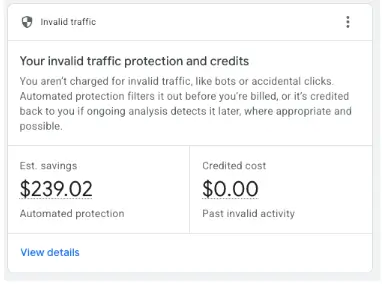
You can access this information by clicking on the “Overview” section on the far left hand side of your account and scrolling down to find it. Google indicates it is actively rolling out so availability is currently limited as of this writing.
The Invalid Traffic Overview Card
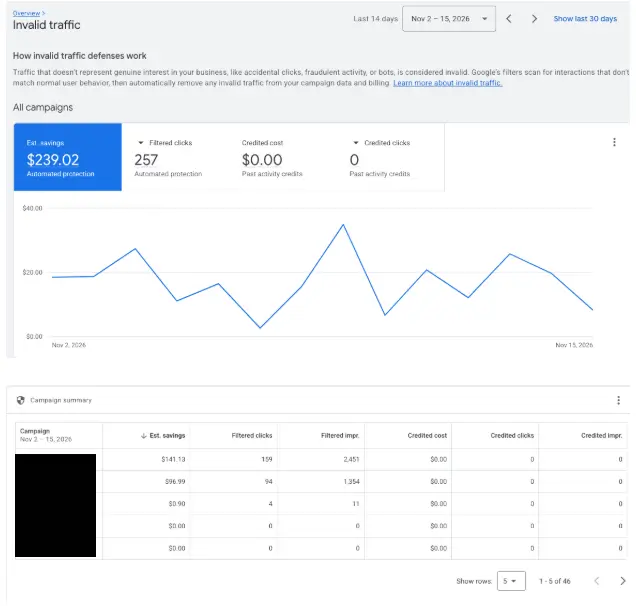
You will find the invalid traffic information in the Invalid Traffic Overview Card. This is an expandable card that initially indicates how many clicks were proactively filtered out prior to being charged (Automated protection) as well as how many were credited back to your account after they were billed (Credited Cost).
Analyzing Detailed Invalid Traffic Reports
If you select the “view details” section, another page opens that will give you additional valuable information, such as invalid clicks by day (based on the date range you have selected), as well as the invalid clicks by campaign.
How to Request an Invalid Traffic Investigation
Over a year ago Google wrote an article indicating they were utilizing AI to fight invalid traffic and the method remains the same regarding reporting invalid traffic. Google is simply making the steps they are proactively taking easier to see. If you notice invalid traffic in your account that has not been proactively filtered out or credited (you can also view the bill credits within the billing section of your account). Then, you can open a click investigation. Make sure you have the below information available prior to opening an investigation (taken from this page):
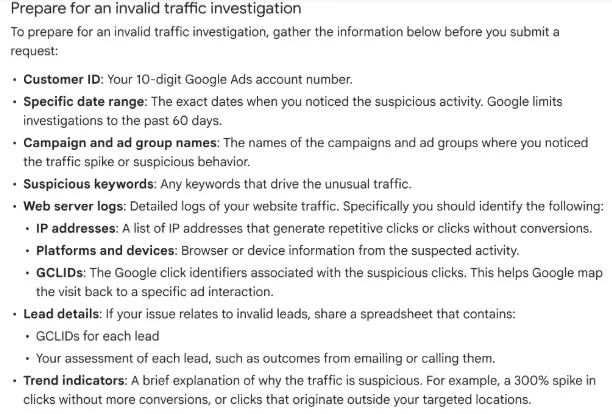
Once you've collected that information, you can submit a Click Quality Form here.
You can only complete Click Quality Investigations once every 30 days per account.
While Google's automated defenses continuously filter and credit invalid traffic behind the scenes, keeping an eye on your account's Invalid Traffic metrics is key to maintaining campaign health. If you suspect invalid activity that hasn't been automatically caught, gathering your account data and utilizing the Click Quality investigation process will help safeguard your advertising investment.